FAQ
Belt printer management
| Rule | What can go wrong if ignored | What may need replacing |
|---|---|---|
| Preheat nozzle before nozzle change. | Stripped threads, leaks, damage. | Full hotend |
| Hold the hotend with a wrench during nozzle change. | Twisted/broken hotend; leaks; wire damage. | Full hotend |
| Clean the nozzle | Strings/blobs. Misprints; failed ejection. | Belt, Full hotend |
| Set & verify Y-offset (peel alignment). | Collisions; seam/edge damage; failed ejection. | Belt, Full hotend |
| Let parts roll off; jog to peel—no yanking. | Belt bend/seam damage; skipped steps. | Belt |
| Load/change filament without heating the belt. | Belt wear; inconsistent adhesion. | Belt |
| Check belt tracking before long runs. | Edge fray; rubbing; skewed prints. | Belt |
| Don’t use metal tools on the belt. | Cuts/nicks; damaged seam; jams | Belt |
| Don’t over-tension the belt; align rollers/idlers. | Binding; step loss; seam separation. | Belt |
| Scraper as close to the belt as possible but not against it. | Too far off; the product won't come off / Too close; the belt will break | Belt |
| Preheat nozzle before load/unload filament. | Filament won’t melt; jams; extruder strain. | Extruder |
“What may need replacing” is not limited to the noted product.
The conductors of the belt printer must be lubricated regularly.
-
If you don't lubricate the belt printer conductors, which are the linear rails, rods, and lead screws that the printer's motion system uses, you risk causing noise, decreased print quality, and premature wear on moving parts.
-
Check the scraper after changing or adjusting the belt itself.
What are the ideal print conditions?
5-30 degrees Celsius/41-86 degrees Fahrenheit.
For your own safety and the optimal workings of the printer it is recommended that you have good ventilation.
My filament is wet, what to do?
If you experience problems with your filament, please check if the material isn’t wet.
Results of the wet filament can look like:
- Stringing (loose print material)
- The quality of the print declines
- Bulbs or deforming material
How to notice that the material is wet?
- The foam doesn’t foam
- A sparking/ticking sound from the nozzle
How to solve this issue?
3 hours in the oven on 50 degrees Celsius, 122 degrees Fahrenheit, or a dry box.
There is no filament coming out of the extruder?
If the nozzle starts too close to the printing surface it will start making a ticking noise, please move the extruder.
If the ticking sound continues or doesn't solve the problem:
-
Please check the distance of the extruder. If there's filament stuck you can get it out by using hard material. Let this go through the extruder.
-
Replace the printhead because the motor has most likely been broken or is damaged. If it still ticks after the last step, the extruder is broken or damaged.
If your extruder doesn’t extrude enough filament, please check if your filament isn’t wet or damaged.
My printer suddenly stopped printing, what to do?
These can be possible reasons that the printer stopped printing, please check if there's any notification on the printer itself.
- The filament is finished or stuck
- The extruder is clogged
The layers of the 3D print moved, what to do?
- Check if the belt is moving correctly and centered.
- Check if the belt rail needs to be lubricated.
- Check the Axis of the printer.
- Check if the motor isn’t blocked.
Nozzle Replacement
Replace the nozzle periodically, depending on your print frequency and filament type. Abrasive filaments, such as those containing metal or wood fillers, require a new nozzle more often.
During printing, the nozzle can become clogged, what to do about this?
- Check if you have the right nozzle
- Clean the nozzle
- Check the diameter, this is most likely inconsistent
Clean the nozzle with a brush, a soft cloth, and compressed air.
The belt runs off the printer
On the print bed: Regularly check the flatness of the print bed.
Ensure the correct distance between the bed and the nozzle, for optimal adhesion of the first layer of filament.
You will see if the belt starts to run off or is off center.
Print object is coming off / Print object is not coming off
- The bed is not the correct level
- The nozzle is starting too far, or too close from the print surface
- The nozzle is too close, or too far away from the print surface
How to fix this issue?
- Go to your browser
- Type in the IP adress of the printer
- Calibrate the offset / move the Y-Axsis up or down.
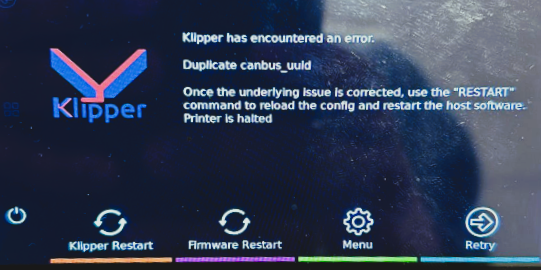
Duplicate canbus error
If you see the following message “Duplicate canbus_uuid”, the cable of the prinhead came loose.
Please adjust this and continue.